








Trendyol Bulk Order Export via Excel

Getting an order list from Trendyol in Excel
Getting an order list from Trendyol in Excel cuts your workload by 90%. Because of the pandemic, cargo companies introduced quota limits and caps, so you can download the Excel file and deliver your cargo quickly.
The method is explained below and is quite simple. Log in at partner.trendyol.com/dashboard. From the top bar, click the Orders / Awaiting shipment tab.

All your orders will appear. Click the Ready for shipment button.
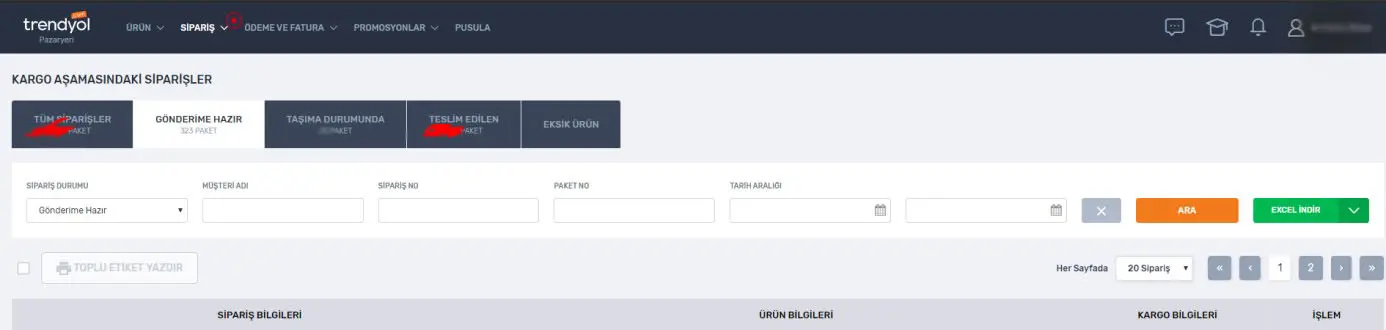
In the date range field on the screen, choose today or the date you want and click Search.

After you click Search, all your orders are listed in front of you. Click the Download Excel button to download all orders as an Excel file, and that's it :)
Practical E-commerce Information
eticaretteyim Yönetici
We create easy-to-follow guides for store owners on e-commerce, hosting and business email.
Was this post helpful?
Comments
No comments yet. Be the first to comment.
Leave a comment
Comments are published after approval. Your email address is never shown on the site.
Related posts

Trendyol Pusula Training #2 Eticaretteyim
TRENDYOL REVIEW SCREENS: Customers who shop from your company can view the comments and rating scores they have left about your company and...

Trendyol in E-commerce: What It Is and How to Sell on It
What is Trendyol? There are several online marketplaces operating in Turkey. Trendyol is one of the leading ones. In its early years it oper...

Online Marketplaces for E-commerce
Nowadays it is hard to find a home without internet. Because so much time is spent online and people reach for their phones in every spare m...

Improving E-Commerce Site Speed and Page Optimization
In today's digital world, competition between e-commerce sites is fiercer than ever. As consumers' patience decreases, how long a website ta...